How to Rename Files Based on Audio Metadata Using Qiplex Smart File Renamer
I was using Qiplex Smart File Renamer to rename my music files from many old hard drive backups. I want to homogenize the names based on the audio metadata so that I can use the Qiplex Speedy Duplicate Finder to de-dupe the files, as I don't want to manually de-dupe the files in iTunes.
The documentation for Qiplex Smart File Renamer is lacking, and I don't understand how to use the rules to rename the files based on the audio metadata, so each file follows this format: Artist Name - Album Name - Song Title.mp3.
I have tried the following:
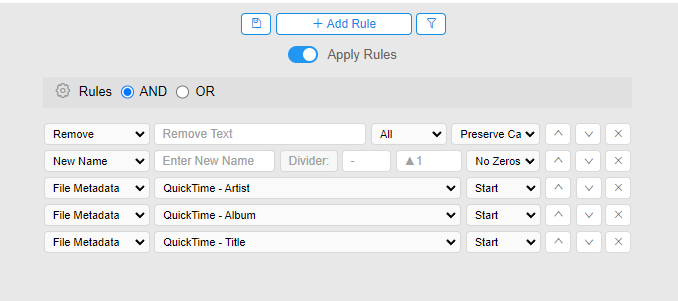
I was hoping this would clear the entirety of the original file name, and then set a new name that follows the Artist - Album - Song Title format. Instead, here is a sample of the output:
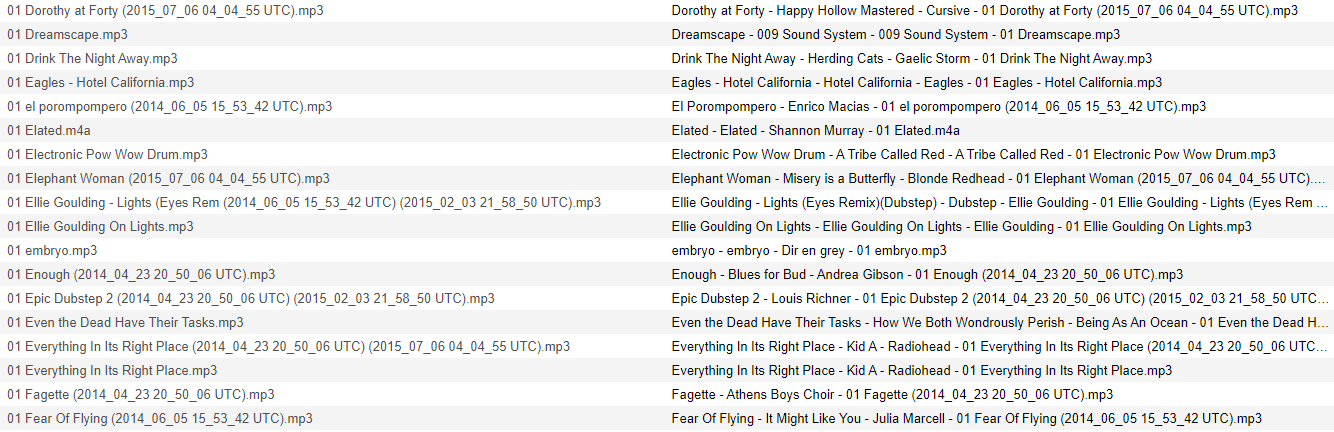
The original file name is still at the end. I can't figure out how to get rid of the original file name and only include the desired new name.
I've tried a few iterations of different rule combinations, but no luck.
Does anyone know how I should go about this? Or if anyone knows a free audio file de-duplicator that doesn't get tripped up on differing file names, that would work too.